
The Building Blocks of an AI Automation Stack
In this article, we break down the core building blocks of an AI automation stack, explained in simple terms, so you can design systems that actually work in the real world.


The Building Blocks of an AI Automation Stack
AI automation is no longer just about replacing repetitive tasks. Modern businesses are building full AI automation stacks that combine workflows, agents, data, and human oversight to scale operations without losing control.
But many teams struggle because they start with tools instead of fundamentals.
In this article, we break down the core building blocks of an AI automation stack, explained in simple terms, so you can design systems that actually work in the real world.
Meta Description
Learn the essential building blocks of an AI automation stack, from data and workflows to AI agents, orchestration, and human oversight.
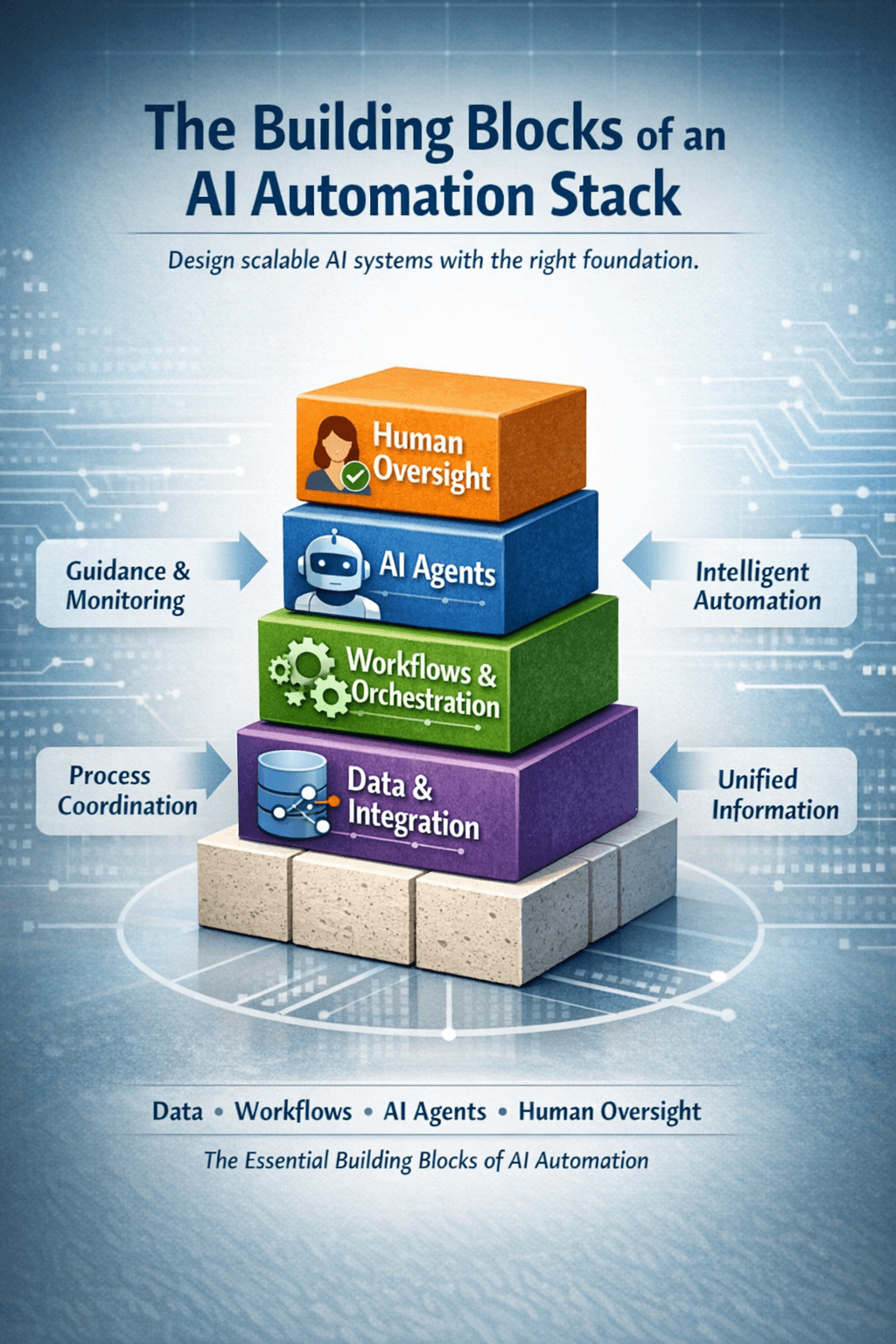
The Building Blocks of an AI Automation Stack
Let’s be honest. Most conversations about AI automation sound like they were written by… well, AI.
Buzzwords everywhere, endless bullet points, and very little clarity on how things actually work.
So let’s do this differently.
This is a plain English breakdown of what really makes up an AI automation stack, how the pieces fit together, and why skipping one usually comes back to haunt you later.
No hype. A bit of humour. Real examples.
First Things First: AI Automation Is a System, Not a Tool
One of the biggest mistakes companies make is treating AI automation like a single product you can plug in and forget about.
It’s not.
A working AI automation stack is more like a kitchen. You can have the fanciest oven in the world, but if you don’t have ingredients, recipes, or someone who knows when things are about to burn, dinner is not happening.
Let’s break down the actual building blocks.
Data: The Messy Foundation Nobody Likes Talking About
Everything starts with data. Customer emails, CRM records, support tickets, internal docs, spreadsheets someone named "final_final_v3".
AI automations don’t need perfect data, but they do need accessible and connected data.
For example, imagine an AI handling customer support. If the agent can see past tickets, the customer’s plan, and recent product issues, it sounds smart. If it can’t, it sounds like a very polite intern guessing.
Most automation failures are not AI failures. They’re data plumbing problems.
AI Models: The Brain, Not the Manager
AI models are great at understanding language, summarising things, and generating responses.
What they are terrible at is deciding what your business should do.
Think of the model as the brain that can read, write, and reason, but not the boss setting priorities.
For example, a model can draft a sales email beautifully. It should not decide which leads deserve that email unless you’ve given it context, rules, and limits.
Left alone, models will confidently do the wrong thing.
AI Workflows: When You Want Reliability Over Creativity
AI workflows are what you use when you want AI to behave itself.
They follow a defined path. Step A happens, then Step B, then Step C, with AI helping inside those steps.
A good example is invoice processing. The workflow is predictable. Receive invoice, extract fields, validate numbers, push to accounting. AI helps read messy PDFs, but the structure stays the same.
Workflows are boring in the best possible way. They are stable, auditable, and don’t surprise you at 2am.
AI Agents: Useful Chaos, If You Design Them Properly
AI agents are different. They decide what steps to take based on the situation.
This makes them perfect for tasks where reality refuses to follow a script.
Take an operations inbox. Emails come in half written, forwarded five times, missing context, or politely angry. An AI agent can read the email, figure out what the person wants, pull the right data, and respond or route it correctly.
That flexibility is powerful. It’s also dangerous.
Without clear goals, tools, and guardrails, agents can drift, make assumptions, or confidently solve the wrong problem.
Agents are great employees. They still need management.
Orchestration: The Part Everyone Forgets Until Things Break
Orchestration is what decides who does what, when, and in what order.
It’s the difference between one helpful automation and ten disconnected ones stepping on each other.
For example, if a sales agent updates the CRM, a marketing workflow might trigger a campaign, while a support agent adjusts priority handling. Without orchestration, those systems don’t talk. With it, they act like a team.
This is where automation platforms earn their keep.
Tools and Integrations: Where Automation Actually Does Something
AI that can’t take action is just a very clever suggestion box.
Real automation means connecting AI to the tools your business already uses. Email, CRMs, databases, internal systems.
Access matters here. Give too much, and you risk chaos. Give too little, and nothing happens.
Good automation stacks are very intentional about what AI can touch.
Humans: Still Very Much Required
Despite what headlines suggest, humans are not optional.
Humans handle edge cases, approvals, sensitive decisions, and the occasional “this feels wrong” moment that no model can explain.
The best AI automation stacks don’t remove people. They remove busywork and give people better leverage.
Monitoring: Because Things Will Go Wrong
Automations are not set and forget. Data changes. Products evolve. Customers behave unpredictably.
Monitoring tells you when agents start drifting, workflows break, or outputs quietly get worse over time.
If you don’t measure it, you will eventually debug it during a crisis.
Final Thoughts
A strong AI automation stack isn’t about choosing between workflows or agents.
It’s about knowing when you want predictability, when you need flexibility, and where humans should stay in control.
Get the building blocks right, and AI becomes a serious advantage.
Get them wrong, and you end up with very confident systems doing very unhelpful things.
Design the system, not just the automation.